
What Is a Digital Jukebox? How It Works and What It Costs
It turns the TV you already own into a jukebox guests control from their phone. Here is what it really costs and whether it fits a bar, restaurant or sports pub.
- Who it is for
- Bar, restaurant and coffee shop owners who want guests to choose the music without an app or a coin box.
- Search intent
- informational
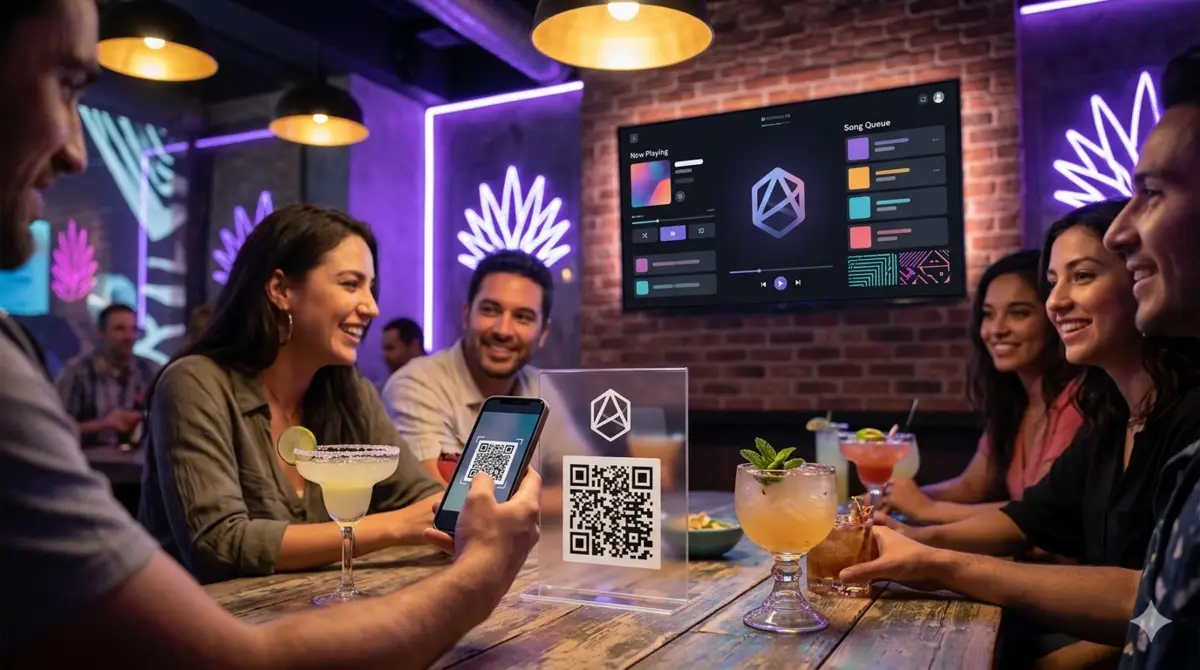
A digital jukebox is a service that turns a screen in your venue — a TV, a projector, a smart monitor — into a jukebox. Guests open a link with their phone, search YouTube for the song on their mind and add it to a single queue that plays on your screen on top of the music system in your bar or restaurant.
The phrase "digital jukebox" covers two very different things, and the confusion is where most purchase mistakes start: a connected machine you buy like the old coin-operated ones, or a service running on screens you already own. This article is about the second, because it is what fits a venue that wants music without a cabinet in the corner and without spending four figures on hardware.
How does a digital jukebox actually work?
There is no installation day and no technician. The venue owner sets it up from a dashboard in about a minute: they enter the business name and WhatsApp or email, and the platform generates a QR code for each table.
The flow at a table looks like this:
- The customer scans the QR code on the table with any phone camera. No app to install.
- They see the search bar and the queue of the venue on a page in their own language.
- They search, pick a YouTube video and it is added to the queue in front, ready to play.
- The screen on the wall plays the video and keeps playing the queue, one after another.
The queue is shared: everyone ordering from their own table is adding to the same list, and everyone sees the same order on the screen. That social part is what a playlist on Spotify, controlled by the staff, cannot copy.
What happens when the queue is empty?
A queue always empties if nobody requests anything for a while, and a screen sitting dead on silent is worse than no screen at all. The platform answers with automatic playback: when the queue is empty, the venue can set the system to keep playing related songs on its own, with the policy applied. It is not a playlist the owner scripts; it is YouTube picking from what usually gets requested in that kind of place.
What does a digital jukebox cost a bar?
The cost line is the big difference versus the old model. You are not buying a machine and you are not paying "plays" from a coin box: you pay a flat monthly subscription per plan. Rockola.app's plans are Starter at $5, Professional at $10 and Premium at $25 USD per month, all with a 30-day free trial and no charge until it ends.
| What you pay for | Old coin jukebox | Rockola.app |
|---|---|---|
| Hardware | $2,000+ plus freight | The TV you already have |
| Music catalog | Fixed, from a provider | YouTube (millions of videos) |
| Per-play cost | Coins per song | None: flat subscription |
| Setting it up | Technician + network | About a minute, on your own |
| Staff involvement | Locked cabinet, keys | Control from a phone |
There is no contract lock-in and no hardware lease: the monthly fee is the entire cost, and canceling leaves the venue exactly as it was.
Digital jukebox vs. Spotify in a bar
Spotify at the bar has two real problems that a QR jukebox solves by design.
Guests cannot request. With Spotify, the person in charge is the one picking, and the request process is walking to the bar and shouting a title over the music. With a QR jukebox, "requesting" is a two-second gesture that stays in the guest's hands.
The mood is one person's playlist. Spotify at a bar becomes the taste of whoever arrived first — or the owner's favorite playlist on loop. A jukebox rotates: the queue is whoever is in the room right now, and venues report that the table ends up asking for songs across decades, which a staff-curated playlist rarely does.
The honest case for Spotify as the main music system is a venue where the music is a branding decision (a niche café with a defined sound) and nobody expects to choose. A QR jukebox is the opposite: the music IS the participation.
What are the limits you should know before buying
A digital jukebox is a YouTube video player with a queue on top. That has three consequences that a venue owner needs to know before signing up:
- It needs internet. The screen and the phones share the venue's Wi-Fi or a 4G plan. If your bar's internet drops, so does the jukebox.
- The catalog is YouTube. Great for variety, but it also means you set the rules: Rockola.app lets venues block artists or songs by title (a "music policy"), so a blacklisted request is rejected before it reaches the queue.
- The music is licensed through YouTube and the platform, not through a separate BMI/ASCAP contract. Check with your local music-licensing rules as you would for any music in a commercial space.
None of these are reasons to skip a QR jukebox. They are the questions to ask before you pick a provider. If you want to see every step of the setup before you decide, our guide to setting up a QR jukebox in your venue walks through the dashboard screen by screen.
Conclusion
A digital jukebox is the cheapest way to put the music in your guests' hands: no new screen, no cabinet, a minute of setup and a flat monthly fee. It works. Try it in your own venue during the free trial and watch one table request a song on its own — that moment is the whole product.
Frequently asked questions
How much does a digital jukebox cost per month?
In Rockola.app, plans are Starter at $5, Professional at $10 and Premium at $25 USD per month, with a 30-day free trial and no charge until it ends. There is no hardware to buy and no per-song fee.
Does a digital jukebox need special speakers or a sound system?
No. It plays through the screen's audio output, so you connect the TV to your existing sound system just as you do with your current music. The jukebox does not replace your audio setup.
Can I limit what guests request?
Yes. Venues can set a music policy that rejects songs and artists by title, so a request that violates it (or an artist the owner does not want on the floor) is blocked before it enters the queue.
Do customers need to install an app?
No. Everything runs in the browser: the customer scans the QR code and requests from the phone's browser without installing anything.
Is a digital jukebox worth it for a small bar?
If you already have a TV, yes: the marginal cost is just the subscription, and the value is a bar where the music is never a complaint and the guests participate.
Try it in your venue
Turn the screen you already own into a digital jukebox
Set up your venue in about a minute and get your own jukebox URL, your table QR and your dashboard. 30-day free trial, no charge until it ends.